What is Speechify?
Speechify is an AI-powered text-to-speech application that reads digital and physical text aloud using natural-sounding voices. Founded in 2016 by Cliff Weitzman, the platform helps users listen to documents, articles, PDFs, emails, and even physical books through their smartphone camera.
The app uses advanced AI to convert any written text into audio, allowing users to consume content while commuting, exercising, or multitasking. Speechify works across multiple platforms including iOS, Android, Chrome browser extension, Mac, and web applications.
Key features include variable playback speeds (up to 5x normal speed), multiple voice options, document scanning through camera, importing from cloud storage, text highlighting synchronization, and offline listening capability. The platform serves students, professionals, people with dyslexia or visual impairments, and anyone seeking to consume content more efficiently.
Why We Use Speechify
- Increased Reading Speed: Listen to content at 1.5x to 3x normal reading speed, consuming books, articles, and documents much faster than traditional reading. Average users save 6+ hours weekly.
- Accessibility for Learning Differences: Essential tool for people with dyslexia, ADHD, or visual impairments. Speechify makes written content accessible through audio, improving comprehension and reducing reading fatigue.
- Multitasking Capability: Listen while commuting, exercising, cooking, or doing household chores. Convert idle time into productive learning time.
- Natural-Sounding Voices: Speechify voices use advanced AI to sound human-like with proper intonation, pacing, and emotional delivery, avoiding robotic text-to-speech quality.
- Reduced Eye Strain: Extended screen reading causes eye fatigue. Listening reduces visual strain while maintaining information retention.
- Better Comprehension: Many users, especially auditory learners, understand and retain information better through listening compared to visual reading.
- Universal Compatibility: Works with virtually any text source—websites, PDFs, ebooks, emails, physical documents via camera scan, Google Docs, and more.
- Study and Work Efficiency: Students use Speechify to review textbooks and research papers. Professionals consume reports, emails, and industry articles more efficiently.
How to Use Speechify: Step-by-Step Method
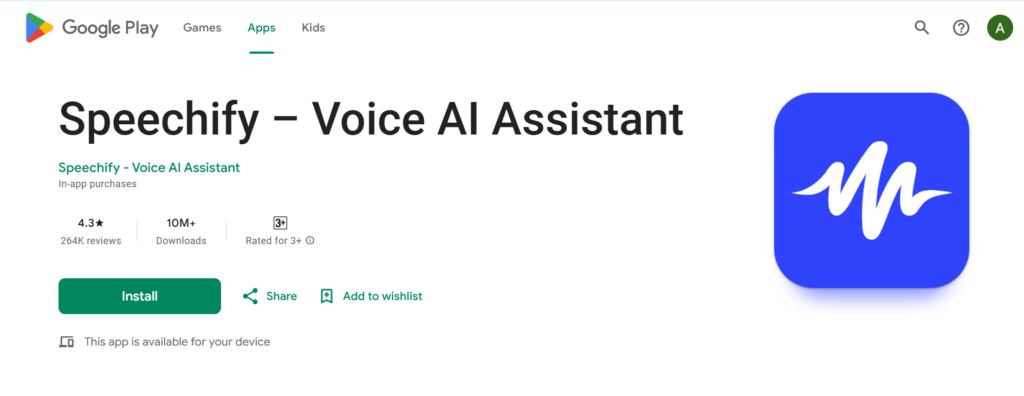
- Download and Install: Get Speechify from the App Store (iOS), Google Play (Android), or add the Chrome extension for desktop browsing. Create a free account to sync across devices.
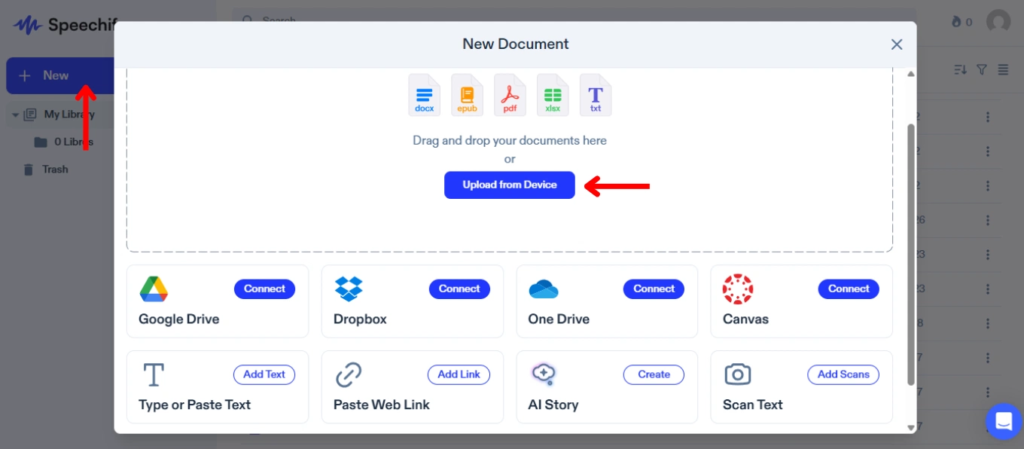
2. Choose Content Source: Select how you want to add text—paste directly, upload files (PDF, DOCX, TXT), scan physical documents with your camera, import from cloud storage (Google Drive, Dropbox), or use browser extension on websites.
3. Select Voice: Choose from 30+ speechify voices including male and female options across different accents (American, British, Australian). Premium voices offer higher quality and more natural delivery.
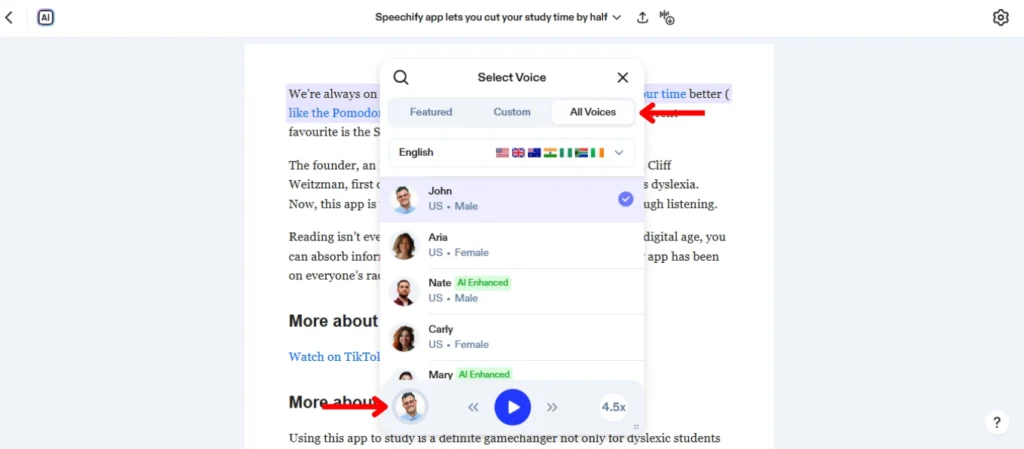
- Adjust Speed: Start at 1x speed and gradually increase as you become comfortable. Most users settle at 1.5x-2.5x speed after adaptation period.
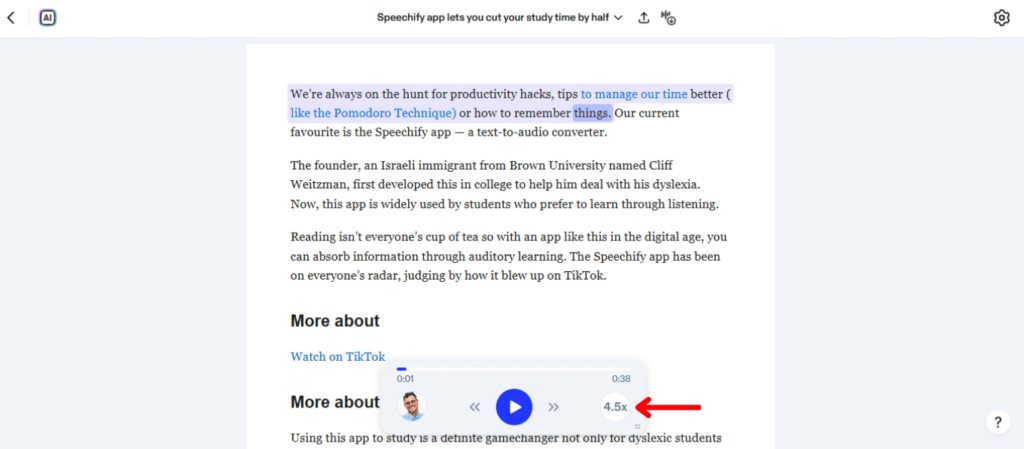
5. Begin Listening: Press play and follow along with highlighted text. Speechify automatically highlights each word as it’s spoken for visual-audio synchronization.
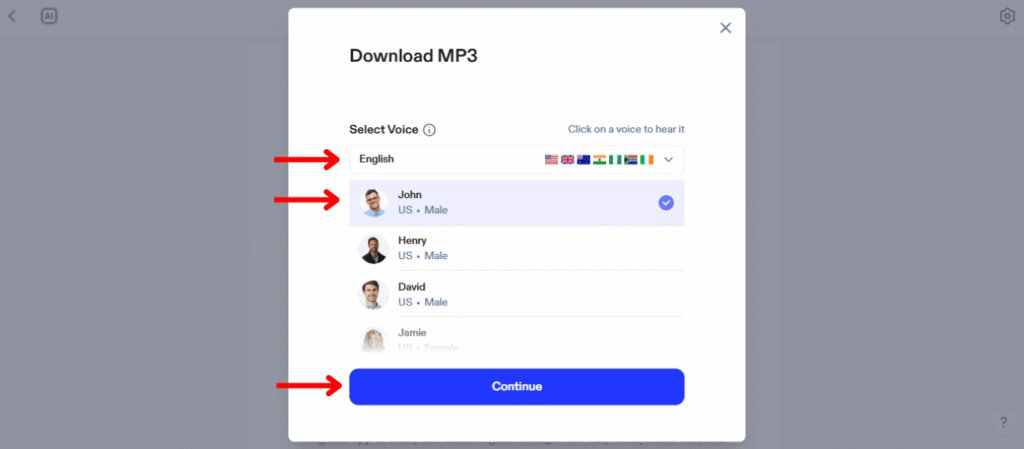
Using Mobile App (iOS/Android)
Scanning Physical Text: Open Speechify camera scanner, position your device over printed text (books, documents, handwritten notes), capture the image, and Speechify converts it to editable text and reads aloud instantly.
Importing Documents: Tap the “+” button to import files from your device, cloud storage services, or paste from clipboard. Supported formats include PDF, DOCX, TXT, EPUB, and images with text.
Creating Playlists: Organize content into playlists for different subjects or projects. Queue multiple documents to listen sequentially without interruption.
Offline Listening: Download content for offline access. Essential for commutes or areas without internet connectivity.
Using Browser Extension
Reading Websites: Click the Speechify extension icon on any webpage. It extracts article text and begins reading. Works on news sites, blogs, social media, and most web content.
Reading Emails: Use Speechify in Gmail or other web email clients to listen to messages. Helpful for processing long email threads or newsletters.
PDF and Document Reading: Open PDFs in browser and activate Speechify to read aloud. Extension recognizes text in most online document viewers.
Advanced Features
Voice Customization: Adjust pitch, speaking rate, and pause length between sentences. Fine-tune settings for optimal listening experience based on content type.
Text Highlighting: Follow along visually as Speechify highlights each word being spoken. Helps maintain focus and comprehension, especially for complex material.
Bookmarks and Notes: Mark important sections, add notes at specific timestamps, and return to key passages easily for review.
Export Audio: Premium users can export documents as audio files (MP3) to listen in other apps or share with others.
Language Support: Speechify supports 15+ languages including Spanish, French, German, Italian, Portuguese, Dutch, and more with native pronunciation.
Integration Features
Google Drive Integration: Access documents directly from Google Drive without downloading. Changes sync automatically.
Dropbox Connection: Import files from Dropbox storage for seamless content management across platforms.
Safari and Chrome Integration: Browser extensions integrate directly into reading experience on supported browsers.
Speechify for Free: What's Included
The free version of Speechify includes basic text-to-speech functionality with limitations:
Free Features:
- Standard voice quality (basic AI voices)
- Reading speed up to 1x normal pace
- Document scanning (limited monthly scans)
- Basic text highlighting
- PDF and document imports (file size limits)
- Web page reading through extension
Free Limitations:
- Only standard voices (premium voices locked)
- Speed limited to 1x (cannot increase beyond normal reading pace)
- Monthly scan limit (typically 10-15 scans)
- No offline listening
- Watermarked audio exports
- No high-fidelity voices
- Limited cloud storage integration
Speechify Voices: Options and Quality
- Standard Voices (Free): Basic AI voices with acceptable quality for casual listening. Sound somewhat synthetic but clearly understandable. Include basic male and female options.
- Premium Voices (Paid): High-quality neural voices that sound remarkably human. Include celebrities like Snoop Dogg and Gwyneth Paltrow, plus professional narrators with emotional range and natural intonation.
- Natural Voices: Advanced AI voices with realistic breathing, pauses, and emotional delivery. Difficult to distinguish from human narrators in casual listening.
- Accent Options: Choose from American, British, Australian, Indian accents across different voice types. Particularly useful for language learners or preference-based listening.
- Celebrity Voices: Premium tier includes famous personalities’ voices for entertainment value and engagement, especially popular among younger users.
- Voice Customization: Adjust speed (0.5x to 5x), pitch (higher or lower), and volume independently for each voice, creating personalized listening experience.
Pricing Plans
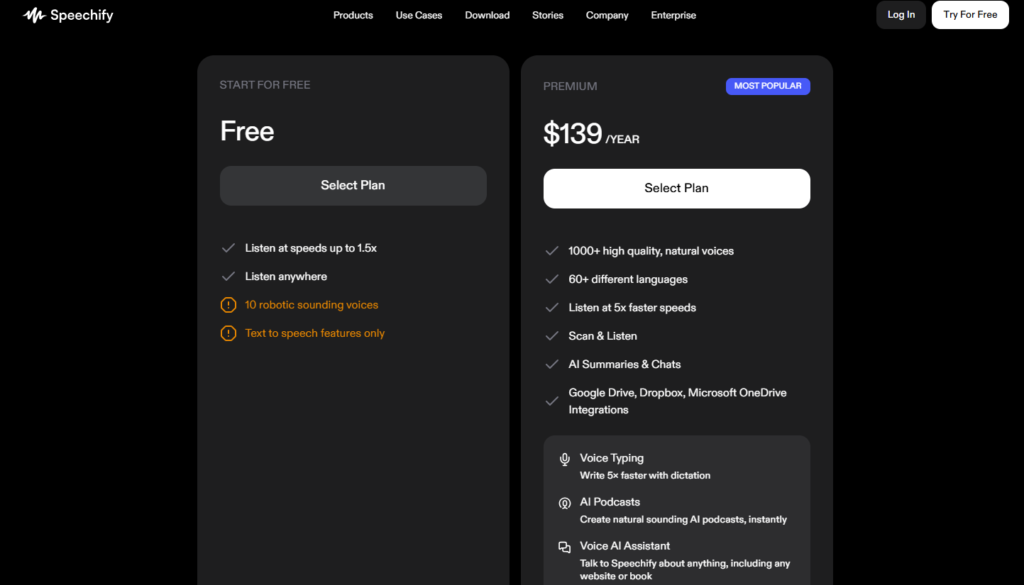
Free Plan: $0—Basic features with standard voices and speed limitations
Premium Plan: $139/year (approximately $11.58/month)—All voices including celebrity options, unlimited speed (up to 5x), unlimited scanning, offline listening, audio export, priority support
Premium+ Plan: Higher tier with additional features for power users and professional applications
Enterprise: Custom pricing for organizations, schools, and businesses requiring team licenses and administrative controls
Premium often discounted during promotional periods. Annual subscription significantly cheaper than monthly billing.
Limitations of Speechify
Technical Limitations
OCR Accuracy Issues: Camera scanning sometimes misreads text, especially with poor lighting, complex layouts, or unusual fonts. Handwriting recognition particularly unreliable.
Formatting Problems: Complex document layouts (multi-column, tables, footnotes) may read in wrong order or skip elements entirely.
Math and Special Characters: Struggles with mathematical equations, chemical formulas, and special symbols. Reads them literally or skips them.
Image Descriptions: Cannot describe images, charts, or graphs. Only reads visible text, missing crucial visual information.
Internet Dependency: Most features require internet connection. Offline mode limited to premium users with pre-downloaded content.
Free Version Restrictions
Speed Limitation: Free users restricted to 1x normal speed, eliminating primary benefit of accelerated listening for many users.
Voice Quality: Standard voices sound noticeably synthetic compared to premium natural voices, affecting listening enjoyment and comprehension.
Scan Limits: Monthly scanning quota too low for students or professionals processing many physical documents.
No Audio Export: Cannot save content as audio files for use in other applications or offline players.
File Size Restrictions: Large documents may be rejected or require splitting into smaller sections.
Content Compatibility
Website Extraction Issues: Some websites with paywalls, dynamic content, or complex layouts fail to extract text properly through browser extension.
DRM-Protected Content: Cannot read DRM-protected ebooks or copyrighted materials with technical protection measures.
PDF with Images: Text embedded as images in PDFs (common in scanned documents) requires OCR processing, which is limited on free tier.
Subscription Content: Cannot access content behind paywalls or requiring login credentials through browser extension.
User Experience Limitations
Learning Curve: Adjusting to listening at high speeds requires practice. Many users initially find it difficult or overwhelming.
Comprehension Trade-offs: While speed increases, comprehension may decrease, especially for complex or technical material. Not suitable for all content types.
Distraction Risk: Multitasking while listening reduces retention compared to focused reading for many users, despite time savings.
Voice Preference: Limited voice options on free tier. Not all premium voices suit every user’s preference or content type.
Platform Limitations
Mobile-First Design: Desktop experience less refined than mobile apps. Some features work better on smartphones.
Storage Constraints: Cloud storage for documents limited even on premium plans. Large libraries require management and deletion.
No Collaborative Features: Cannot share notes, highlights, or annotated documents with others. Lacks team or study group functionality.
Export Format Limits: Audio exports only available in limited formats. No advanced audio editing or customization options.
Privacy and Data Concerns
Cloud Processing: Documents uploaded to Speechify servers for processing, raising privacy concerns for sensitive or confidential materials.
Data Retention: Unclear how long uploaded content remains on servers even after deletion from user account.
Terms of Service: Free users grant broad usage rights to content uploaded, potentially affecting proprietary or sensitive materials.
Tips for Best Results
- Gradual Speed Increase: Start at 1x-1.3x speed and increase gradually over days or weeks. Rushing to high speeds reduces comprehension.
- Content Selection: Use Speechify for straightforward content first (articles, books). Avoid starting with highly technical or dense material.
- Active Listening: Minimize distractions and stay engaged. Passive listening while doing complex tasks reduces retention.
- Good Quality Scans: When scanning physical text, ensure good lighting, flat pages, and clear focus. Rescan if OCR produces errors.
- Choose Appropriate Voices: Match voice to content—professional voice for work materials, conversational voice for casual reading.
- Use Highlighting: Follow visual highlighting to maintain focus and improve comprehension, especially at higher speeds.
- Take Breaks: Extended listening sessions can cause mental fatigue. Take regular breaks like you would with visual reading.
Alternatives to Consider
- Natural Reader: Similar functionality with different pricing structure. Better for desktop users.
- Voice Dream Reader: iOS-focused with extensive customization but higher upfront cost.
- Microsoft Immersive Reader: Free built into Office 365 and Edge browser with basic TTS functionality.
- Google Play Books: Built-in read-aloud for purchased ebooks within Google ecosystem.
- Browser Built-in TTS: Chrome, Edge, and Safari include basic read-aloud features without additional software.
Frequently Asked Questions
Speechify is an AI-powered text-to-speech app that converts written text from documents, websites, PDFs, and physical books into natural-sounding audio, helping users consume content through listening.
Yes, Speechify offers a free version with basic features including standard voices and document scanning. However, premium features like high-quality voices, unlimited speed, and offline listening require paid subscription ($139/year).
Download Speechify from App Store or Google Play for free basic access. New users get a 3-day free trial of Premium features. Students can request educational discounts for extended free or reduced-cost access.
Speechify voices include 30+ options with male and female voices in various accents (American, British, Australian). Premium subscription unlocks high-quality natural voices and celebrity voices like Snoop Dogg.
Free users are limited to 1x normal speed. Premium subscribers can adjust speed from 0.5x to 5x normal reading pace, with most users comfortable at 1.5x-2.5x speed.
Yes, Speechify includes camera scanning that converts physical text from books, documents, and handwritten notes into editable text and audio. Free users have monthly scan limits.
Offline listening is only available for Premium subscribers who download content in advance. Free users require internet connection for all functionality.
Speechify supports PDF, DOCX, TXT, EPUB, HTML, and images containing text. Files can be uploaded directly or imported from cloud storage services.
Yes, Speechify syncs across iOS, Android, web, and browser extension. One account works on all platforms with progress synchronized via cloud.
Yes, Speechify is widely used by people with dyslexia. Audio reading reduces strain and improves comprehension for many users with reading difficulties.
Premium users can export documents as MP3 audio files. Free users cannot export audio and must listen within the Speechify app.
Speechify supports 15+ languages including Spanish, French, German, Italian, Portuguese, Dutch, Chinese, and Japanese with appropriate native pronunciation.
Yes, Speechify offers educational discounts for verified students. Discounts vary but can significantly reduce annual Premium subscription cost.
Scanning accuracy depends on lighting, text quality, and layout complexity. Clear printed text in good lighting scans with 95%+ accuracy. Handwriting and complex layouts less reliable.